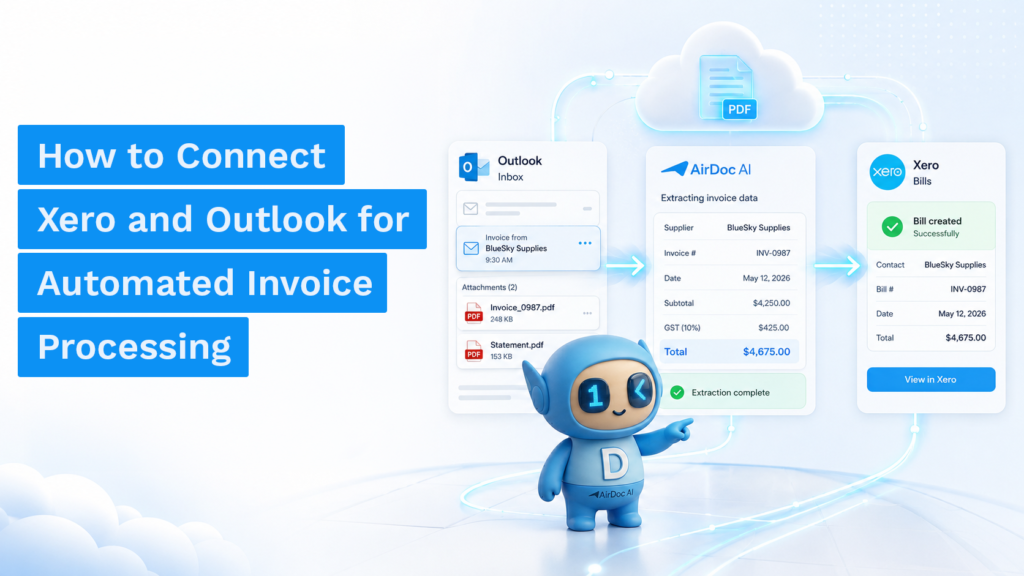
AP automation for small business is software that captures invoice data from your email inbox or other sources, extracts the fields, and posts bills directly into Xero, QuickBooks, or MYOB — no manual data entry, no forwarding, no upload required.
This is different from what most small businesses have today, which is a capture tool that requires invoices to be submitted before anything happens. The submission step is still manual. True AP automation removes it.
What AP automation actually covers
Accounts payable covers everything from receiving a supplier invoice to paying it. For a small business, the manual steps are typically:
- Collecting invoices from email, post, and WhatsApp
- Entering supplier name, invoice number, date, amounts, and GST into accounting software
- Attaching the source document to the bill
- Coding to the correct account and tracking category
- Reviewing and approving before payment
- Paying and reconciling
AP automation tools primarily address the first three steps: collection, data entry, and document attachment. Payment and reconciliation are handled by your accounting software. Approval workflows are handled by some tools and not others.
Why small businesses struggle with AP specifically
Larger businesses justify AP automation on pure volume. A company processing 1,000 invoices per month can quantify the saving clearly. For small businesses processing 30-200 invoices per month, the volume is lower but the constraint is different: it is usually one or two people doing everything, and invoice processing competes directly with higher-value work.
A bookkeeper handling a small business client spending 3 hours per month on invoice entry is spending roughly A$105 in labour at a modest rate. Across 20 clients, that is A$2,100 per month in AP data entry alone. This is the business case for AP automation at small business scale: not headcount reduction but time recovered and redirected.
The inbox problem that most tools do not solve
The majority of B2B invoices in Australia arrive by email. This creates an AP problem that most capture tools handle awkwardly: you have to forward every invoice from your inbox to a separate submission address, or download it and upload it to the capture tool, or install a plugin that checks your inbox but requires setup per supplier.
The cleanest solution is a tool that connects to your Gmail or Outlook inbox via OAuth and monitors it automatically. When an invoice arrives, the tool detects it, extracts the data, and creates the bill in your accounting system without any forwarding or upload. This is what AI document processing enables at a level traditional OCR tools could not reach reliably.
What to look for in AP automation software for small business
Inbox monitoring vs. submission-based capture
If your invoices arrive by email, choose a tool that monitors your inbox, not one that requires you to forward or upload. Submission-based capture moves the manual step, it does not remove it.
Line-item extraction
Header-only extraction gives you supplier, date, total, and GST. Line-item extraction gives you individual products, quantities, unit prices, and per-line GST. If you reconcile against purchase orders or track inventory, you need line items. If you only need bills posted at total level, header extraction is sufficient.
Native integration with your accounting platform
A native Xero or MYOB integration means the tool uses the accounting platform’s official API to post bills directly. A workaround integration via CSV export or a third-party connector adds friction and failure points. For small business, native integration to your specific platform is non-negotiable.
Pricing model
AP automation tools price per document, per user, per client, or on a flat monthly basis. For small business, per-document pricing is the most predictable when volume is stable. Per-client pricing suits bookkeeping practices. Per-user pricing tends to penalise growth. Watch for credits that expire and minimum monthly commitments.
AP automation for Xero
Xero’s native Bills feature accepts bills via the Xero inbox (invoices emailed to a Xero-specific address) or via connected capture tools. Hubdoc is included with most Xero plans but extracts header data only. For line items and inbox monitoring, you need a third-party integration.
AirDoc AI connects to Xero via OAuth and posts bills natively with line items. The Microsoft 365 and Xero workflow covers the setup for businesses using Outlook. The Gmail and Xero workflow covers the Gmail-first setup.
AP automation for MYOB
MYOB AccountRight and MYOB Business both support bill entry via the In Tray feature, which accepts emailed documents. Third-party tools that integrate with MYOB include Dext, AirDoc AI, and Lightyear. See how MYOB invoice automation works with AirDoc AI.
AP automation for QuickBooks
QuickBooks Online supports bill entry via its own Receipt Capture feature, which requires upload or email forwarding. For automated inbox monitoring with line-item extraction and native QBO posting, third-party tools fill the gap that QBO’s native feature leaves.
What does AP automation cost for a small business?
At the lower end of the market, AP automation tools for small business range from free (AirDoc AI Starter at 500 documents per month) to A$50-300 per month depending on volume and features. The comparison that matters is not tool cost versus zero: it is tool cost versus the labour cost of manual processing.
Manual invoice entry in Australia runs approximately A$35 per hour for a bookkeeper’s time. At 3 minutes per invoice, each manually processed invoice costs approximately A$1.75. At 200 invoices per month, that is A$350 in labour. An automation tool at A$199 per month for that volume reduces the AP processing cost by more than half, before accounting for reduced errors and faster coding.
FAQ
What is accounts payable automation for small business?
AP automation for small business is software that automatically captures invoice data from email or other sources, extracts the relevant fields, and posts bills to your accounting system without manual data entry. The goal is to remove the time spent on invoice processing so the bookkeeper or business owner can focus on exceptions and decisions rather than data entry.
How long does it take to set up AP automation?
For an inbox-monitoring tool like AirDoc AI, setup takes under 10 minutes: connect your Gmail or Microsoft 365 account via OAuth, connect your Xero, QuickBooks, or MYOB account, and set your preferences for account coding and draft vs. approved status. There is no supplier onboarding or format configuration required.
Does AP automation work with Australian GST requirements?
Yes. Australian-focused AP automation tools extract GST from each line item or at invoice total level, and post bills to Xero, MYOB, or QuickBooks with the appropriate tax codes. AirDoc AI is built specifically for Australian and New Zealand accounting requirements.
Can AP automation handle invoices from any supplier?
Modern AI-based extraction tools process invoices from any supplier without pre-configuration or template setup. Unlike older OCR tools that required a template per supplier, AI extraction reads the document structure and identifies the relevant fields regardless of format. Quality varies with document quality: structured PDFs extract more accurately than scanned handwritten invoices.